Documentation Index
Fetch the complete documentation index at: https://docs.neoagent.io/llms.txt
Use this file to discover all available pages before exploring further.
To enable Neo Agent to interact with your ConnectWise system, you need to create a dedicated security role with the right permissions and then create an API member using that role.
This process involves creating a custom security role called “Neo”, configuring permissions across ConnectWise modules, and setting up API member credentials.
How Neo Agent Permissions Work
Neo Agent uses two layers of access control to keep your ConnectWise data safe:
- ConnectWise Security Role (what you configure here) — sets the maximum API access available, just like setting up any technician account.
- Neo Agent Dashboard — where you choose exactly what Neo can do. You configure permission groups that control which areas Neo can read, write, or ignore — and whether actions require technician approval first.
Think of it like onboarding a new team member: you give them a security role in ConnectWise so they can access the areas they need, then their manager decides which tasks they actually work on. The ConnectWise role is the ceiling — Neo Agent’s dashboard settings are the actual controls.
Granting API permissions here does not mean Neo Agent will use them all. It simply ensures Neo can operate when you enable a capability in the dashboard. You stay in control of what Neo actually does.
Creating the Security Role and API Member
Create a new 'Neo' security role
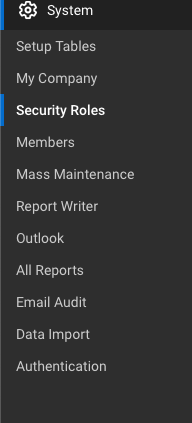
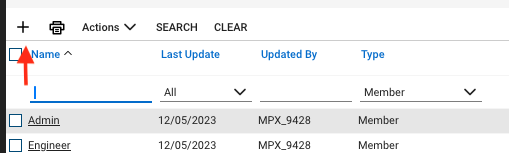
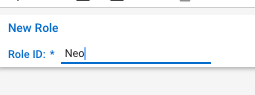
In ConnectWise, navigate to System → Security Roles and create a new security role for Neo Agent.Set the Role ID to Neo and save the role. Grant read access (Inquire Level)
Set Inquire Level to All for all entries in every module listed below. This gives Neo Agent the ability to look up information across your ConnectWise system — read access alone does not allow any modifications.| Security Module | Inquire Level |
|---|
| Service Desk | All (all entries) |
| Companies | All (all entries) |
| Time & Expense | All (all entries) |
| Project | All (all entries) |
| Finance | All (all entries) |
| Procurement | All (all entries) |
| Sales | All (all entries) |
| Marketing | All (all entries) |
| System | All (all entries) |
Neo Agent needs broad read access to provide accurate context when resolving tickets — looking up company details, checking SLA coverage, finding related configurations, reviewing agreements, and referencing system metadata. Read-only access is safe and helps Neo make better decisions.
Double-check API Reports under the System module is set to Inquire = All. ConnectWise treats the API Reports entry separately from the other System entries, and without it Neo Agent falls back to slower per-ticket lookups when batching note history. Granting Inquire on System → API Reports lets Neo use the batched system/reports/ServiceNote endpoint, which meaningfully reduces API volume on busy tenants.
Grant write access (Add and Edit Levels)
Set Add Level and Edit Level to All for the specific entries listed below. These are the core areas Neo Agent needs to resolve tickets, manage time, and handle day-to-day operations.Service Desk
| Entry | Add Level | Edit Level |
|---|
| Service Tickets | All | All |
| Close Service Tickets | All | All |
| Service Ticket - Dependencies | All | All |
| Merge Tickets | All | All |
| Resource Scheduling | All | All |
| Knowledge Base Creator | All | All |
| Ticket Templates | All | All |
Companies
| Entry | Add Level | Edit Level |
|---|
| Company Maintenance | All | All |
| Configurations | All | All |
| Contacts | All | All |
| Manage Attachments | All | All |
| Management | All | All |
| Notes | All | All |
Time & Expense
| Entry | Add Level | Edit Level |
|---|
| Time Entry | All | All |
| Time Entry Billable Option | All | All |
Project
| Entry | Add Level | Edit Level |
|---|
| Close Project Tickets | All | All |
| Close Projects | All | All |
| Project Headers | All | All |
| Project Notes | All | All |
| Project Ticket - Dependencies | All | All |
| Project Ticket Tasks | All | All |
| Project Tickets | All | All |
Finance
| Entry | Add Level | Edit Level |
|---|
| Agreements | All | All |
| Billing View Time | All | All |
Procurement
| Entry | Add Level | Edit Level |
|---|
| Products | All | All |
| Product Catalog | All | All |
System
| Entry | Add Level | Edit Level |
|---|
| My Company | All | All |
| Table Setup | All | All |
Sensitive areas — left read-only intentionally. The following entries should keep Add, Edit, and Delete levels at None. Neo Agent does not need write access to these areas, and leaving them read-only protects your financial records and security settings:
- Finance: Invoicing, Invoice Approval, Billing Rate Maintenance, Accounting Interface, Agreement Invoicing, Billing Reconciliation, Company Finance, Expense Reimbursements
- Procurement: Purchase Orders, Purchasing Approvals
- System: Member Maintenance, Security Roles, Add Licenses
- Sales: All entries (Opportunity, Sales Orders, Sales Funnel, etc.)
- Marketing: All entries (Campaigns, Marketing Groups, etc.)
You can grant write access to these areas later if needed — for example, if you want Neo Agent to manage sales opportunities or create purchase orders. Grant delete access for schedule entries
Delete permissions are only needed for one specific entry:| Security Module | Entry | Delete Level |
|---|
| Service Desk | Resource Scheduling | All |
This allows Neo Agent to manage schedule entries (e.g., rescheduling or removing technician appointments). No other delete permissions are required.
Create API member and generate keys
Create the API Member using your newly configured security role:
-
Navigate to System → Members → API Members
-
Create a new API member with the following settings:
- Security Role: Select the “Neo” role you created
- Email: Set to
team@neoagent.io
- Member ID: Use a descriptive identifier like
neo_agent
-
Generate API credentials:
- Create API Keys with a description like “Neo-API”
- You’ll receive both Public and Private keys
Make note of the following information as you’ll need it for the connection setup:
- API Member identifier (text-based Member ID, e.g.,
neo_agent)
- Public Key (acts as username)
- Private Key (acts as password)
What’s Next?
Once you’ve successfully created the API member with proper permissions, you’re ready to connect it to Neo Agent using the credentials and configuration details from your new API member.
Before proceeding, ensure you have:
- The API Member identifier (Member ID)
- The Public Key (username)
- The Private Key (password)
- Your ConnectWise PSA URL
- Your exact company name from the ConnectWise login screen